
Published on: 2025-07-21
Originally built in 2022, I have Cat-Dog Classification TFLite Flutter project served as an experiment in mobile machine learning. This project was recently revisited to evaluate how PocketFlow-Tutorial-Codebase-Knowledge can assist in documenting and explaining the workflow more effectively.
📦 Why Use PocketFlow-Tutorial-Codebase-Knowledge
PocketFlow-Tutorial-Codebase-Knowledge is an AI-powered tool that automatically generates documentation, tutorials, and diagrams by analyzing any codebase. Manual documentation, especially for older projects, can be time-consuming. This tool was tested to determine its effectiveness in handling the Cat-Dog classifier and streamlining the documentation process.
🚀 How It Was Used
1️⃣ Cloning the Tool
Begin with the 🚀 Getting Started section at PocketFlow GitHub. An error related to the model was encountered, requiring an update in utils/call_llm.py:
# model = os.getenv("GEMINI_MODEL", "gemini-2.5-pro-exp-03-25")
model = os.getenv("GEMINI_MODEL", "gemini-2.0-flash")
Run the following command to verify model compatibility:
python utils/call_llm.py
2️⃣ Running the Tool
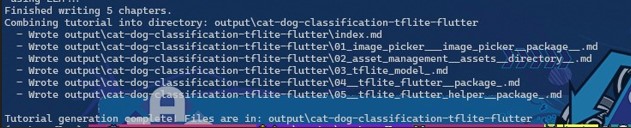
To generate documentation, the repository path must be provided. The tool will scan and analyze the project codebase. Example:
python main.py --repo https://github.com/malebolgia/Cat-Dog-Classification-tensor-flow-lite-flutterGenerated documentation will appear in the output/ directory.
📊 Process Overview
A simple flow of how PocketFlow-Tutorial-Codebase-Knowledge works:
%7d%23m05620699067083622-0 .edgeLabel rect%7bopacity:.5%3bbackground-color:rgba(232%2c232%2c232%2c.8)%3bfill:rgba(232%2c232%2c232%2c.8)%7d%23m05620699067083622-0 .labelBkg%7bbackground-color:rgba(232%2c232%2c232%2c.5)%7d%23m05620699067083622-0 :root%7b--mermaid-font-family:arial%2csans-serif%7d%3c/style%3e%3cmarker id='m05620699067083622-0_flowchart-v2-pointEnd' class='marker flowchart-v2' markerHeight='8' markerUnits='userSpaceOnUse' markerWidth='8' orient='auto' refX='5' refY='5' viewBox='0 0 10 10'%3e%3cpath d='m0 0 10 5-10 5z' class='arrowMarkerPath' style='stroke-width:1%3bstroke-dasharray:1%2c0'/%3e%3c/marker%3e%3cmarker id='m05620699067083622-0_flowchart-v2-pointStart' class='marker flowchart-v2' markerHeight='8' markerUnits='userSpaceOnUse' markerWidth='8' orient='auto' refX='4.5' refY='5' viewBox='0 0 10 10'%3e%3cpath d='m0 5 10 5V0z' class='arrowMarkerPath' style='stroke-width:1%3bstroke-dasharray:1%2c0'/%3e%3c/marker%3e%3cmarker id='m05620699067083622-0_flowchart-v2-circleEnd' class='marker flowchart-v2' markerHeight='11' markerUnits='userSpaceOnUse' markerWidth='11' orient='auto' refX='11' refY='5' viewBox='0 0 10 10'%3e%3ccircle cx='5' cy='5' r='5' class='arrowMarkerPath' style='stroke-width:1%3bstroke-dasharray:1%2c0'/%3e%3c/marker%3e%3cmarker id='m05620699067083622-0_flowchart-v2-circleStart' class='marker flowchart-v2' markerHeight='11' markerUnits='userSpaceOnUse' markerWidth='11' orient='auto' refX='-1' refY='5' viewBox='0 0 10 10'%3e%3ccircle cx='5' cy='5' r='5' class='arrowMarkerPath' style='stroke-width:1%3bstroke-dasharray:1%2c0'/%3e%3c/marker%3e%3cmarker id='m05620699067083622-0_flowchart-v2-crossEnd' class='marker cross flowchart-v2' markerHeight='11' markerUnits='userSpaceOnUse' markerWidth='11' orient='auto' refX='12' refY='5.2' viewBox='0 0 11 11'%3e%3cpath d='m1 1 9 9m0-9-9 9' class='arrowMarkerPath' style='stroke-width:2%3bstroke-dasharray:1%2c0'/%3e%3c/marker%3e%3cmarker id='m05620699067083622-0_flowchart-v2-crossStart' class='marker cross flowchart-v2' markerHeight='11' markerUnits='userSpaceOnUse' markerWidth='11' orient='auto' refX='-1' refY='5.2' viewBox='0 0 11 11'%3e%3cpath d='m1 1 9 9m0-9-9 9' class='arrowMarkerPath' style='stroke-width:2%3bstroke-dasharray:1%2c0'/%3e%3c/marker%3e%3cg class='root'%3e%3cg class='edgePaths'%3e%3cpath id='L_A_B_0' marker-end='url(%23m05620699067083622-0_flowchart-v2-pointEnd)' d='M138 86v46' class='edge-thickness-normal edge-pattern-solid edge-thickness-normal edge-pattern-solid flowchart-link'/%3e%3cpath id='L_B_C_0' marker-end='url(%23m05620699067083622-0_flowchart-v2-pointEnd)' d='M138 190v46' class='edge-thickness-normal edge-pattern-solid edge-thickness-normal edge-pattern-solid flowchart-link'/%3e%3cpath id='L_C_D_0' marker-end='url(%23m05620699067083622-0_flowchart-v2-pointEnd)' d='M138 294v46' class='edge-thickness-normal edge-pattern-solid edge-thickness-normal edge-pattern-solid flowchart-link'/%3e%3cpath id='L_D_E_0' marker-end='url(%23m05620699067083622-0_flowchart-v2-pointEnd)' d='M138 398v46' class='edge-thickness-normal edge-pattern-solid edge-thickness-normal edge-pattern-solid flowchart-link'/%3e%3c/g%3e%3cg class='edgeLabels'%3e%3cg class='edgeLabel'%3e%3cforeignObject width='0' height='0' class='label'%3e%3cdiv xmlns='http://www.w3.org/1999/xhtml' class='labelBkg' style='display:table-cell%3bwhite-space:nowrap%3bline-height:1.5%3bmax-width:200px%3btext-align:center'%3e%3cspan class='edgeLabel'/%3e%3c/div%3e%3c/foreignObject%3e%3c/g%3e%3cg class='edgeLabel'%3e%3cforeignObject width='0' height='0' class='label'%3e%3cdiv xmlns='http://www.w3.org/1999/xhtml' class='labelBkg' style='display:table-cell%3bwhite-space:nowrap%3bline-height:1.5%3bmax-width:200px%3btext-align:center'%3e%3cspan class='edgeLabel'/%3e%3c/div%3e%3c/foreignObject%3e%3c/g%3e%3cg class='edgeLabel'%3e%3cforeignObject width='0' height='0' class='label'%3e%3cdiv xmlns='http://www.w3.org/1999/xhtml' class='labelBkg' style='display:table-cell%3bwhite-space:nowrap%3bline-height:1.5%3bmax-width:200px%3btext-align:center'%3e%3cspan class='edgeLabel'/%3e%3c/div%3e%3c/foreignObject%3e%3c/g%3e%3cg class='edgeLabel'%3e%3cforeignObject width='0' height='0' class='label'%3e%3cdiv xmlns='http://www.w3.org/1999/xhtml' class='labelBkg' style='display:table-cell%3bwhite-space:nowrap%3bline-height:1.5%3bmax-width:200px%3btext-align:center'%3e%3cspan class='edgeLabel'/%3e%3c/div%3e%3c/foreignObject%3e%3c/g%3e%3c/g%3e%3cg class='nodes'%3e%3cg id='flowchart-A-0' class='node default' transform='translate(138 47)'%3e%3crect width='260' height='78' x='-130' y='-39' class='basic label-container'/%3e%3cg class='label' transform='translate(-100 -24)'%3e%3crect/%3e%3cforeignObject width='200' height='48'%3e%3cdiv xmlns='http://www.w3.org/1999/xhtml' style='display:table%3bwhite-space:break-spaces%3bline-height:1.5%3bmax-width:200px%3btext-align:center%3bwidth:200px'%3e%3cspan class='nodeLabel'%3e%3cp%3eRun PocketFlow-Tutorial-Codebase-Knowledge%3c/p%3e%3c/span%3e%3c/div%3e%3c/foreignObject%3e%3c/g%3e%3c/g%3e%3cg id='flowchart-B-1' class='node default' transform='translate(138 163)'%3e%3crect width='177.391' height='54' x='-88.695' y='-27' class='basic label-container'/%3e%3cg class='label' transform='translate(-58.695 -12)'%3e%3crect/%3e%3cforeignObject width='117.391' height='24'%3e%3cdiv xmlns='http://www.w3.org/1999/xhtml' style='display:table-cell%3bwhite-space:nowrap%3bline-height:1.5%3bmax-width:200px%3btext-align:center'%3e%3cspan class='nodeLabel'%3e%3cp%3eScan Repository%3c/p%3e%3c/span%3e%3c/div%3e%3c/foreignObject%3e%3c/g%3e%3c/g%3e%3cg id='flowchart-C-3' class='node default' transform='translate(138 267)'%3e%3crect width='194.313' height='54' x='-97.156' y='-27' class='basic label-container'/%3e%3cg class='label' transform='translate(-67.156 -12)'%3e%3crect/%3e%3cforeignObject width='134.313' height='24'%3e%3cdiv xmlns='http://www.w3.org/1999/xhtml' style='display:table-cell%3bwhite-space:nowrap%3bline-height:1.5%3bmax-width:200px%3btext-align:center'%3e%3cspan class='nodeLabel'%3e%3cp%3eAnalyze Codebase%3c/p%3e%3c/span%3e%3c/div%3e%3c/foreignObject%3e%3c/g%3e%3c/g%3e%3cg id='flowchart-D-5' class='node default' transform='translate(138 371)'%3e%3crect width='167.609' height='54' x='-83.805' y='-27' class='basic label-container'/%3e%3cg class='label' transform='translate(-53.805 -12)'%3e%3crect/%3e%3cforeignObject width='107.609' height='24'%3e%3cdiv xmlns='http://www.w3.org/1999/xhtml' style='display:table-cell%3bwhite-space:nowrap%3bline-height:1.5%3bmax-width:200px%3btext-align:center'%3e%3cspan class='nodeLabel'%3e%3cp%3eGenerate Docs%3c/p%3e%3c/span%3e%3c/div%3e%3c/foreignObject%3e%3c/g%3e%3c/g%3e%3cg id='flowchart-E-7' class='node default' transform='translate(138 475)'%3e%3crect width='200.5' height='54' x='-100.25' y='-27' class='basic label-container'/%3e%3cg class='label' transform='translate(-70.25 -12)'%3e%3crect/%3e%3cforeignObject width='140.5' height='24'%3e%3cdiv xmlns='http://www.w3.org/1999/xhtml' style='display:table-cell%3bwhite-space:nowrap%3bline-height:1.5%3bmax-width:200px%3btext-align:center'%3e%3cspan class='nodeLabel'%3e%3cp%3eReview %26amp%3b Edit Docs%3c/p%3e%3c/span%3e%3c/div%3e%3c/foreignObject%3e%3c/g%3e%3c/g%3e%3c/g%3e%3c/g%3e%3c/svg%3e)
%7d%23m05460563288037533-0 :root%7b--mermaid-font-family:arial%2csans-serif%7d%3c/style%3e%3cmarker id='m05460563288037533-0_flowchart-v2-pointEnd' class='marker flowchart-v2' markerHeight='8' markerUnits='userSpaceOnUse' markerWidth='8' orient='auto' refX='5' refY='5' viewBox='0 0 10 10'%3e%3cpath d='m0 0 10 5-10 5z' class='arrowMarkerPath' style='stroke-width:1%3bstroke-dasharray:1%2c0'/%3e%3c/marker%3e%3cmarker id='m05460563288037533-0_flowchart-v2-pointStart' class='marker flowchart-v2' markerHeight='8' markerUnits='userSpaceOnUse' markerWidth='8' orient='auto' refX='4.5' refY='5' viewBox='0 0 10 10'%3e%3cpath d='m0 5 10 5V0z' class='arrowMarkerPath' style='stroke-width:1%3bstroke-dasharray:1%2c0'/%3e%3c/marker%3e%3cmarker id='m05460563288037533-0_flowchart-v2-circleEnd' class='marker flowchart-v2' markerHeight='11' markerUnits='userSpaceOnUse' markerWidth='11' orient='auto' refX='11' refY='5' viewBox='0 0 10 10'%3e%3ccircle cx='5' cy='5' r='5' class='arrowMarkerPath' style='stroke-width:1%3bstroke-dasharray:1%2c0'/%3e%3c/marker%3e%3cmarker id='m05460563288037533-0_flowchart-v2-circleStart' class='marker flowchart-v2' markerHeight='11' markerUnits='userSpaceOnUse' markerWidth='11' orient='auto' refX='-1' refY='5' viewBox='0 0 10 10'%3e%3ccircle cx='5' cy='5' r='5' class='arrowMarkerPath' style='stroke-width:1%3bstroke-dasharray:1%2c0'/%3e%3c/marker%3e%3cmarker id='m05460563288037533-0_flowchart-v2-crossEnd' class='marker cross flowchart-v2' markerHeight='11' markerUnits='userSpaceOnUse' markerWidth='11' orient='auto' refX='12' refY='5.2' viewBox='0 0 11 11'%3e%3cpath d='m1 1 9 9m0-9-9 9' class='arrowMarkerPath' style='stroke-width:2%3bstroke-dasharray:1%2c0'/%3e%3c/marker%3e%3cmarker id='m05460563288037533-0_flowchart-v2-crossStart' class='marker cross flowchart-v2' markerHeight='11' markerUnits='userSpaceOnUse' markerWidth='11' orient='auto' refX='-1' refY='5.2' viewBox='0 0 11 11'%3e%3cpath d='m1 1 9 9m0-9-9 9' class='arrowMarkerPath' style='stroke-width:2%3bstroke-dasharray:1%2c0'/%3e%3c/marker%3e%3cg class='root'%3e%3cg class='edgePaths'%3e%3cpath id='L_A_B_0' marker-end='url(%23m05460563288037533-0_flowchart-v2-pointEnd)' d='M138 86v46' class='edge-thickness-normal edge-pattern-solid edge-thickness-normal edge-pattern-solid flowchart-link'/%3e%3cpath id='L_B_C_0' marker-end='url(%23m05460563288037533-0_flowchart-v2-pointEnd)' d='M138 190v46' class='edge-thickness-normal edge-pattern-solid edge-thickness-normal edge-pattern-solid flowchart-link'/%3e%3cpath id='L_C_D_0' marker-end='url(%23m05460563288037533-0_flowchart-v2-pointEnd)' d='M138 294v46' class='edge-thickness-normal edge-pattern-solid edge-thickness-normal edge-pattern-solid flowchart-link'/%3e%3cpath id='L_D_E_0' marker-end='url(%23m05460563288037533-0_flowchart-v2-pointEnd)' d='M138 398v46' class='edge-thickness-normal edge-pattern-solid edge-thickness-normal edge-pattern-solid flowchart-link'/%3e%3c/g%3e%3cg class='edgeLabels'%3e%3cg class='edgeLabel'%3e%3cforeignObject width='0' height='0' class='label'%3e%3cdiv xmlns='http://www.w3.org/1999/xhtml' class='labelBkg' style='display:table-cell%3bwhite-space:nowrap%3bline-height:1.5%3bmax-width:200px%3btext-align:center'%3e%3cspan class='edgeLabel'/%3e%3c/div%3e%3c/foreignObject%3e%3c/g%3e%3cg class='edgeLabel'%3e%3cforeignObject width='0' height='0' class='label'%3e%3cdiv xmlns='http://www.w3.org/1999/xhtml' class='labelBkg' style='display:table-cell%3bwhite-space:nowrap%3bline-height:1.5%3bmax-width:200px%3btext-align:center'%3e%3cspan class='edgeLabel'/%3e%3c/div%3e%3c/foreignObject%3e%3c/g%3e%3cg class='edgeLabel'%3e%3cforeignObject width='0' height='0' class='label'%3e%3cdiv xmlns='http://www.w3.org/1999/xhtml' class='labelBkg' style='display:table-cell%3bwhite-space:nowrap%3bline-height:1.5%3bmax-width:200px%3btext-align:center'%3e%3cspan class='edgeLabel'/%3e%3c/div%3e%3c/foreignObject%3e%3c/g%3e%3cg class='edgeLabel'%3e%3cforeignObject width='0' height='0' class='label'%3e%3cdiv xmlns='http://www.w3.org/1999/xhtml' class='labelBkg' style='display:table-cell%3bwhite-space:nowrap%3bline-height:1.5%3bmax-width:200px%3btext-align:center'%3e%3cspan class='edgeLabel'/%3e%3c/div%3e%3c/foreignObject%3e%3c/g%3e%3c/g%3e%3cg class='nodes'%3e%3cg id='flowchart-A-0' class='node default' transform='translate(138 47)'%3e%3crect width='260' height='78' x='-130' y='-39' class='basic label-container'/%3e%3cg class='label' transform='translate(-100 -24)'%3e%3crect/%3e%3cforeignObject width='200' height='48'%3e%3cdiv xmlns='http://www.w3.org/1999/xhtml' style='display:table%3bwhite-space:break-spaces%3bline-height:1.5%3bmax-width:200px%3btext-align:center%3bwidth:200px'%3e%3cspan class='nodeLabel'%3e%3cp%3eRun PocketFlow-Tutorial-Codebase-Knowledge%3c/p%3e%3c/span%3e%3c/div%3e%3c/foreignObject%3e%3c/g%3e%3c/g%3e%3cg id='flowchart-B-1' class='node default' transform='translate(138 163)'%3e%3crect width='177.391' height='54' x='-88.695' y='-27' class='basic label-container'/%3e%3cg class='label' transform='translate(-58.695 -12)'%3e%3crect/%3e%3cforeignObject width='117.391' height='24'%3e%3cdiv xmlns='http://www.w3.org/1999/xhtml' style='display:table-cell%3bwhite-space:nowrap%3bline-height:1.5%3bmax-width:200px%3btext-align:center'%3e%3cspan class='nodeLabel'%3e%3cp%3eScan Repository%3c/p%3e%3c/span%3e%3c/div%3e%3c/foreignObject%3e%3c/g%3e%3c/g%3e%3cg id='flowchart-C-3' class='node default' transform='translate(138 267)'%3e%3crect width='194.313' height='54' x='-97.156' y='-27' class='basic label-container'/%3e%3cg class='label' transform='translate(-67.156 -12)'%3e%3crect/%3e%3cforeignObject width='134.313' height='24'%3e%3cdiv xmlns='http://www.w3.org/1999/xhtml' style='display:table-cell%3bwhite-space:nowrap%3bline-height:1.5%3bmax-width:200px%3btext-align:center'%3e%3cspan class='nodeLabel'%3e%3cp%3eAnalyze Codebase%3c/p%3e%3c/span%3e%3c/div%3e%3c/foreignObject%3e%3c/g%3e%3c/g%3e%3cg id='flowchart-D-5' class='node default' transform='translate(138 371)'%3e%3crect width='167.609' height='54' x='-83.805' y='-27' class='basic label-container'/%3e%3cg class='label' transform='translate(-53.805 -12)'%3e%3crect/%3e%3cforeignObject width='107.609' height='24'%3e%3cdiv xmlns='http://www.w3.org/1999/xhtml' style='display:table-cell%3bwhite-space:nowrap%3bline-height:1.5%3bmax-width:200px%3btext-align:center'%3e%3cspan class='nodeLabel'%3e%3cp%3eGenerate Docs%3c/p%3e%3c/span%3e%3c/div%3e%3c/foreignObject%3e%3c/g%3e%3c/g%3e%3cg id='flowchart-E-7' class='node default' transform='translate(138 475)'%3e%3crect width='200.5' height='54' x='-100.25' y='-27' class='basic label-container'/%3e%3cg class='label' transform='translate(-70.25 -12)'%3e%3crect/%3e%3cforeignObject width='140.5' height='24'%3e%3cdiv xmlns='http://www.w3.org/1999/xhtml' style='display:table-cell%3bwhite-space:nowrap%3bline-height:1.5%3bmax-width:200px%3btext-align:center'%3e%3cspan class='nodeLabel'%3e%3cp%3eReview %26amp%3b Edit Docs%3c/p%3e%3c/span%3e%3c/div%3e%3c/foreignObject%3e%3c/g%3e%3c/g%3e%3c/g%3e%3c/g%3e%3c/svg%3e)
🐶🐱 Output Summary
PocketFlow-Tutorial-Codebase-Knowledge generated the following:
- A project overview
- Setup instructions (including Windows batch file)
- Model creation details
- Code structure explanations and diagrams
The generated content serves as a solid starting point and can be refined as needed to match the project’s narrative.
💡 Tips for Effective Use
- Always review and customize the generated content.
- Use Mermaid diagrams to clarify structure and flow.
- Re-run the tool after major updates with your app to maintain up-to-date documentation.
🎉 Conclusion
PocketFlow-Tutorial-Codebase-Knowledge simplifies the task of documenting machine learning projects. Whether revisiting an older project or seeking to automate technical documentation, this tool provides an efficient and intelligent starting point.
Links: